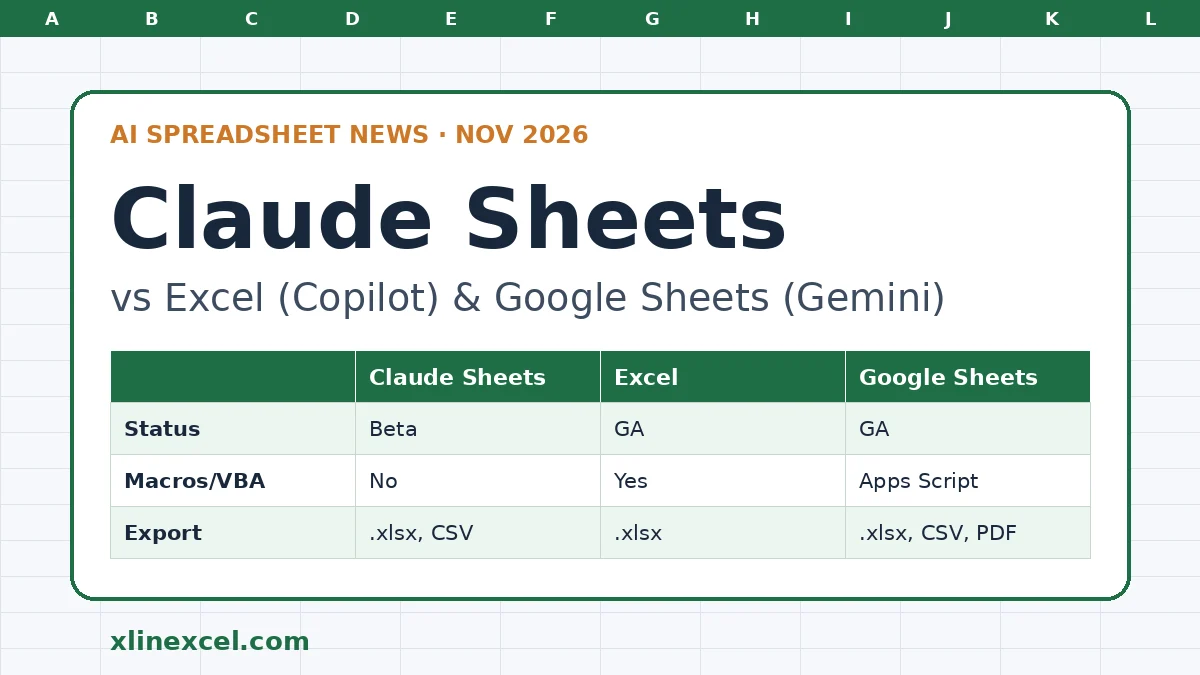
Claude Sheets is Anthropic’s new spreadsheet built directly into Claude. Announced on November 10, 2026 at an event in San Francisco, it lets you ask for a tracker, budget or model in plain English and get a working sheet with tabs, formulas and formatting that you, your team and Claude can edit together. It is a beta, though, and it is not trying to replace every part of Excel yet.
Below is what Claude Sheets does, who can use it today, its current limits, and how it compares with Copilot in Excel and Gemini in Google Sheets. Every detail is checked against Anthropic’s official launch announcement and the Claude Sheets help center guide, plus coverage from The Verge, Engadget and TechCrunch.
What Is Claude Sheets?
Claude Sheets is a type of artifact (Anthropic’s name for the documents and apps Claude creates). Instead of Claude producing a table you then copy into another program, the sheet stays inside Claude, where Claude can keep editing it alongside you.
It launched together with Claude Whiteboards (also in beta) and Claude Meetings (beta, for Team and Enterprise). At the same time, Claude Dashboards became generally available under a new name, Claude Data. Together they join Anthropic’s existing Claude Docs, Slides, Design and Motion tools, which is why The Verge described the launch as Anthropic’s own AI-powered office suite.
Key Features of Claude Sheets
According to Anthropic’s help center, Claude Sheets can do the following:
- Build from a prompt: ask for something like a campaign tracker or hiring budget and Claude generates the sheet.
- Real spreadsheet structure: multiple tabs, formulas that work across tabs, formatting, conditional formatting, drop-downs, checkboxes and charts.
- Visible formulas: formulas stay in the cells, so you can check how every number was calculated.
- Tracked AI edits: each change Claude makes is outlined as it lands, and you can undo Claude’s changes.
- Ask about a range: select cells and ask questions such as “Why is this total higher than last month?”
- Edit by hand: type values and formulas yourself; Claude Sheets includes over 250 functions.
- Live collaboration: people with “Can edit” access work in the same cells at the same time, and can leave comments.
- Import and export: import CSV, Excel or Google Sheets files (or paste data), and export as .xlsx or CSV.
Anthropic is open about the scope: “For now, sheets have simple spreadsheet functionality.” When you need full Excel power, it suggests exporting to .xlsx or using its separate Claude for Excel add-in. You can also send work on to partner tools including Airtable, Asana, monday.com and Smartsheet.
Availability, Plans and Beta Caveats
Before you plan around Claude Sheets, note these conditions from Anthropic’s own pages:
- Beta only: Claude Sheets is a beta product, and features may change.
- Paid plans only: available on Pro, Max, Ultra, Team and Enterprise. It is not included in the Free plan. Pro is listed at $20 per month billed monthly ($17 per month with annual billing).
- Admin settings: on by default for Team plans, off by default for Enterprise until an owner turns it on in Organization settings > Artifacts.
- Platforms: web, desktop, Claude for iOS and Claude for Android.
- Usage limits: work in Sheets counts toward your plan’s normal Claude usage limits.
- Compliance: not yet available to organizations with HIPAA-ready configurations or zero data retention for Claude Code, and sheets are not covered by zero data retention.
- Region: the announcement does not list separate country restrictions for Sheets, so access follows wherever paid Claude plans are offered.
Current Limitations
- A sheet can hold over 500,000 filled cells.
- Built-in charts are bar, line and pie, plus other chart types Claude can generate.
- Not available yet: multi-select drop-downs and PDF export.
- Excel features not supported: macros, VBA, Power Query, DAX and print layout.
- No live data: sheets cannot pull live data from connected apps, and docs, decks and dashboards cannot use a sheet as a data source.
- Sharing: “Anyone with the link” opens the sheet view-only, and only for people signed in to Claude.
Claude Sheets vs Excel (Copilot) vs Google Sheets (Gemini)
The big difference is where the AI lives. Copilot sits inside Excel and Gemini sits inside Google Sheets, so the AI comes to your existing spreadsheet app. Claude Sheets works the other way round: the spreadsheet lives inside the AI assistant.
| Feature | Claude Sheets | Excel + Copilot | Google Sheets + Gemini |
|---|---|---|---|
| Status (Nov 2026) | Beta, launched Nov 10, 2026 | Generally available; new Copilot features roll out gradually | Generally available; new Gemini features roll out gradually |
| Where it lives | Inside Claude (artifact) | Inside Excel desktop, web and mobile | Inside Google Sheets |
| Who gets it | Claude Pro, Max, Ultra, Team, Enterprise | Microsoft 365 Personal/Family with an AI credits plan, Microsoft 365 Premium, or eligible business/Copilot licenses | Workspace Business/Enterprise Standard and Plus, Google AI Pro and Ultra, AI Expanded Access |
| Build a sheet from a prompt | Yes, core feature | Yes, via Copilot | Yes, “build and edit spreadsheets” with Gemini |
| Advanced tools | Over 250 functions; no macros, VBA, Power Query or DAX | Full Excel: Power Query, VBA, PivotTables, DAX | Full Sheets: Apps Script, QUERY, IMPORTRANGE, AI function |
| Real-time co-editing | Yes, with Claude editing too | Yes, via OneDrive/SharePoint | Yes |
| Live data connections | Not yet | Yes (Power Query, data types) | Yes (connected sheets, IMPORT functions) |
| File export | .xlsx and CSV | Native .xlsx | .xlsx, CSV, PDF and more |
If you already use Copilot, our guide to the latest Copilot in Excel features covers clean data, get data and skills. Gemini users can also turn a sheet into an interactive mini-app, as explained in how to publish a Google Sheets canvas.
Who Should Try Claude Sheets?
Claude Sheets makes most sense if you already pay for Claude and build lightweight trackers, budgets, plans or simple models with your team. Watching every AI edit highlighted in place, with formulas left visible, is a good fit for checking AI work rather than trusting a pasted answer.
Stay with Excel or Google Sheets when your workbook relies on macros, Power Query, DAX, Apps Script, live data feeds or print-ready layouts, or when your company’s data rules (such as HIPAA or zero data retention) apply. A practical middle path is to draft in Claude Sheets, then export to .xlsx and finish in Excel, or use Claude for Excel inside the files you already have.
Claude Sheets FAQ
Is Claude Sheets free?
No. Claude Sheets (beta) is included only with paid Claude plans: Pro, Max, Ultra, Team and Enterprise. The Free plan does not include it.
Can I open Claude Sheets files in Excel?
Yes. You can export any sheet as an .xlsx or CSV file and open it in Excel or Google Sheets. You can also import Excel and Google Sheets files into Claude Sheets.
Does Claude Sheets support macros or VBA?
No. Anthropic lists macros, VBA, Power Query, DAX and print layout as Excel features that Claude Sheets does not support.
How is Claude Sheets different from Claude for Excel?
Claude Sheets puts a spreadsheet inside Claude. Claude for Excel is an add-in that brings Claude into your existing Excel workbooks, so use it when a file has to stay in Excel.
Is Claude Sheets available on mobile?
Yes. It works on the web, the Claude desktop app, and Claude for iOS and Android.
